Sunday, November 25, 2012

Gift guide to full-size tablets for 2012 Christmas

Apart from Smartphone, Tablets are at the top of many wish lists this holiday season. But what to get now becomes a problem. The choice used to be pretty limited, with the iPad dominating in the tablets market. But this year, the field is more even, as tablets from Apple's competitors have matured.  In addition, Google, Amazon and Microsoft now providing us more choice by designed their own tablets, Just like Nexus 7, Surface and Kinder Fire HD.
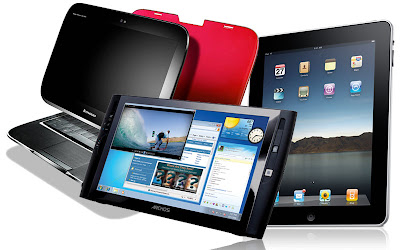
Tablets
The first step in buying tablets is to decide on the size of tablets you want to buy. They fall into two rough categories: the full-sized tablet, pioneered by the iPad, and the half-size tablet, epitomized by the Kindle Fire.

Full-sized tablets, which generally have screens measuring about 10 inches on the diagonal, are better for surfing websites designed for PCs, and far better when it comes to displaying magazines and documents. Overall, they go further toward replacing a laptop. They cost $400 and up.

Half-sized tablets, which have screens measuring roughly 7 inches on the diagonal, are cheaper and lighter, but just as good as full-sized tablets for e-book reading. It's an excellent first computing device for a kid, or a gentle nudge into the digital world for an older adult with little computing experience. This year's crop costs $199 and up, but last year's models are available for less.

If you've settled on a large tablet, here are some top choices for you.
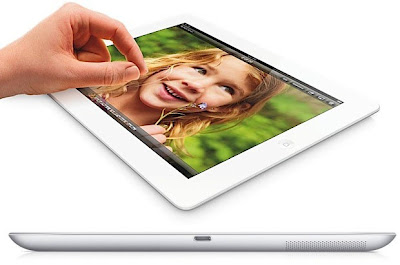
  • Apple iPad 4(starts at $499)
iPad 4
Apple’s iPad 4 features a new A6X chip, faster processor than before and the new "Lightning" connection and charging port, replacing the wide port inherited from the iPod. Like the third-generation iPad, it has an ultra-high-resolution "Retina" screen. The model's resolution of 2,048 by 1,536 pixels is only surpassed by the Google Nexus 10. Apple Claim that it’s the best mobile display ever.

While other tablets are starting to approach it in terms of hardware, the iPad still enjoys the best support by far from third parties, both in terms of quality applications and accessories like cases. Now Over 275,000 apps are designed specifically for iPad.

One caveat: the base model of the iPad has only 16 gigabytes of storage, which fills up fast these days. The thoughtful giver goes for at least a 32-gigabyte model, for $100 more.
  • Google Nexus 10 (starts at $399)
Nexus 10
This is Google's first full-size tablet and the only tablet from any manufacturer that beats the screen resolution of the iPad. It boasts 2,560 by 1,600 pixels, a third more than the fourth-generation iPad. With this Tablets,You can enjoy almost all Google Service on it and get the new features of Android 4.2 including NFC (Android Beam), Photo Sphere, Multi-user support and more. Most importantly,It starts only at $399 which is $100 cheaper than iPad 4.
  • Microsoft Surface (starts at $499)
It is Microsoft's first tablet which runs Windows RT, a version of Windows 8 adapted for tablets. It comes with a version of Microsoft's Office suite and the ability to connect to wireless printers and some other peripherals, like USB drives. The covers for it have functional keyboard printed on the inside.

The Surface includes 32GB and 64GB version and The screen resolution is 1,366 by 768 pixels. Not so badly. So If you want to experience the Windows RT or like the office service, you can try this one.
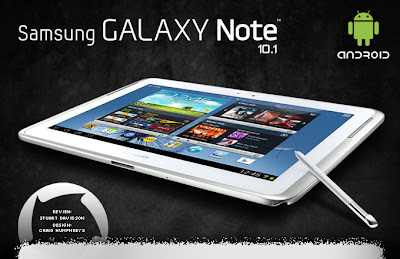
  • Samsung Galaxy Note 10.1 (starts at $499)
Samsung Galaxy Note 10.1
It's the only tablet in our roundup that comes with a "pen" that can be used to write and draw on the screen. You can Draw, write, edit photos and share with the intuitive S Pen.

The Note 10.1 runs Google's Android software, giving it access to a wide array of apps originally written for smartphones. The selection is not on par with the iPad's but better than other alternatives.

But The Note's screen falls into the low-resolution category, sporting 1,280 by 800 pixels, not as well as iPad or the Nook HD+. Like the Nook, the Note 10.1's storage memory can be expanded with cards.
  • Barnes & Noble c (starts at $269)
Barnes & Noble Nook HD+
For a book store, Barnes & Noble makes some amazing tablets. The HD+ is its first model that approaches the iPad in size, with a screen that's 9 inches on the diagonal. That makes it slightly smaller than the iPad, and the resolution is lower as well, but still very respectable. At 1,920 by 1,280 pixels, it can show more detail than a living-room HDTV.

Like the basic iPad, the basic Nook HD+ comes with just 16 gigabytes of storage memory, but it can be expanded with a microSD memory card. That means another 32 gigabytes will cost you just $25 — a good deal.

But the Nook is the least versatile tablet in our roundup. The number of apps available is small, and it's focused on Barnes & Noble content like e-books, magazines and movies. It doesn't have any cameras, while the competitors have two each. It's best for someone who's likely to stick to media consumption, and doesn't need the latest apps and games.
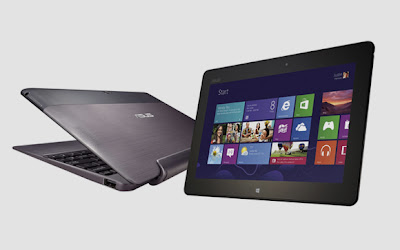
  • Asus Vivo Tab RT (starts at $599 with a dock)
Asus Vivo Tab RT
The tablet part is smaller and thinner than the Surface. Together with the keyboard, it makes for a familiar little setup: a tiny laptop running Windows. Like the Surface, it has a memory card slot and a USB port. The screen resolution is the same.
The Vivo Tab is a good tool for those who want to get some work done on the commute or plane, or those who can't decide if they want a laptop or a tablet.

So, have you got your favorite one ?

Tips:

Thursday, November 22, 2012

Skype 3.0 for Android: It’s better than before, but still needs work

Microsoft-owned Skype has being keeping busy with its mobile apps, with the firm having just released upgrades for both Android and Windows 8.

Skype 3.0

The good: Skype for Android has fantastic audio quality and impressive video call quality. The newest version have a new user interface design for tablets.

The bad: No group video chats. Video quality can sometimes be choppy and pixelated.

The bottom line: If you're an active Skype member, then Skype for Android is absolutely a must-download. If you're not, then it's still great for making one-to-one video calls and even voice calls to landlines and mobile numbers (for a charge).

Here I will check everything about the new Skype 3.0 in details.

The good: New features, Tips
Skype, now owned by Microsoft, has released a large update for its Android App on Tuesday, boasting improved audio quality thanks to Skype’s own SILK codec and impressive video call quality. The new software version also boasting a new user interface design for tablets which makes use of the additional screen estate, and now work better on the larger screens of Android tablets. That is to say, “Now you can share the moment, a photo or a smile on the most popular Android tablets including the Samsung Galaxy Tab 2, the Google Nexus 7, Acer Iconia, Asus Transformer Prime, Motorola Xoom and Sony S,” Skype writes in a blog.

As before, the app also comes with built-in SMS capabilities, instant messaging for chatting with your Skype connections, and file transfers between users. Managing your contacts within the app is easy as Skype integrates with your Android address book.

Skype 3.0 for Android devices also allows users to sign in and merge their Skype account with their Microsoft account.


Try to update the app or just download the app to have a try if you are a new user.The voice calling experience is quite good.

Skype for Android 3.0 is available to download for free from Google Play.For windows phone 8 user, you can download on the Windows phone store. For iPhone user, download the app by on the iTunes App Store.


The bad:
Skype 3.0 is still incapable of group video chats, which is a shame, since the feature is growing in popularity. But you can use the Google+ Hangouts to help you if you like group-video chats.

Google+ Hangouts
With Google+ Hangouts, you can catch up with the whole family -- whether you’re on your computer, phone or tablet device, and you can have free video conferencing for up to 10 people. I guess that Skype's developers are hard at work trying to perfect the feature for their product.

The bottom line:
Skype now has 280 million monthly users, and mobile been a major part of Skype’s growth story in the last few years, so if you're an active Skype member, then Skype for Android is absolutely a must-download. If you want to have a one on one video chat, and your friend list is hosted at Facebook, the new Facebook video chat is perfect for you.

Top 6 Free Android Shopping Apps to Get a Better Shopping Experience

Top Android Shopping app
When android tablets have become more and more nature in our daily life, we can use our tablets to do almost everything including shop online. And there are many online retailers offering nearly all kinds of goods range from groceries to the next technological gadget. So Android shopping apps is a must for a frequent online shopper or a deal finders, especiaally at this shopping season with so much Black Friday Deals. Following I would like to list the top free shopping apps for Android.

Official eBay Android App

At present, Official eBay Android App is the most popular shopping app on Google Play.You can search all of the current listings for the auction site and bid and anything that you can do on the website has been made mobile.It just lets the eBay shopper shop on the go. The app is definitely essential for the eBay shopper on the go.Also,you can check out weekly episodes of unique motors-inspired video series.It is indeed a must-have app for eBay buyers and sellers.

Amazon Mobile

If you are Amazon fans, then Amazon Mobile is definitely the shopping app for you.You can search for products and buy them right from the app,meanwhile,you can read reviews and even leave your own feedback from the app.With the app,Amazon customers have full access to their existing cart, wish lists, payment and Amazon Prime member shipping options, order history, 1-Click settings and can also take advantage of google.com' Subscribe & Save.If you want to know the Amazon deals,you can check out this app Amazon Lightning Deals Widget.

Shopper

Shopper is developed by Google to help you find accurate information on millions of products.You can find the best deals when you want to find the lowest price with Shopper.Also, Shopper offers the deals closest to you.With one click you can save items to your shopping list and share with your friends.

RedLaser Barcode & QR Scanner

If you want to save your money as much as possible,then try this top shopping app RedLaser Barcode & QR Scanner which not only scan barcodes but QR codes as well.You can search for prices from thousands of online retailers for millions of products and compare them at the same time to find the best price.Also,you can view top deals of the day or browse deals by store.It’s really an all-around great app that should be the essential for any user.

The Coupons App

For coupon finders,The Coupons App is very useful to look for coupon at fingertips.Real-time coupons and daily deals throughout each day is offered for you when you install the app.Via the app,you can also search coupons and local groupon daily deals while shopping, share deals or coupons with others,fast and easily search coupons by voice search,use BARCODE scanner to compare the price.Best,you can find the goods Black Friday retail leaks.

Groupon
 
As one of the most popular coupon and discount deal makers,Groupon offers hot daily deals that almost everyone would love.With the app, you can buy and redeem Groupons directly from your Android tablet,track your purchased coupons by location and expiration date and save ink and avoid traumatic paper cuts by never printing another voucher or coupon.If you want to find the best deal, I think you can check out this one. 

I hope you can enjoy this list and find a useful one to make your best shopping experience online. 

Related :Shopping apps For iPad

The First Brush Pack To Update Samsung Galaxy S I9000 For Android 4.2

Have you ever head of CyanogenMod which is the world's largest third-party compiler team for Android. The released Android 2.1 kernel CM5 Series ROM is widely used to promote third-party upgrade from Android 1.6 to Android 2.1 version.This team became the first to customize a stable 1.6 ROM which goes prior to Google for many Android phones.

As we know Google released Android 4.2 Jelly bean on Oct.30 this year, the new features like Gesture Typing,Smart Screen-Savers, Multi-user support ,you can visit Android official site or just click here to read for the detailed Android 4.2 new features.

So are you touched by the Android new features.And the good news is that @pawitp of CyanogenMod was working on the brush pack of Samsung Galaxy S I9000. And now the brush pack for Android 4.2 were released to download.

As Pawitp said this brush pack is developed based on the source code for Android 4.2 Jelly Bean from AOSP (Android Open-Source Project).Most functions of the phone can work, including but not limited to RIL(Radio Interface Layer) ,Datanetwork,WiFi,camera,sound,GPS,TV-Out,and Android 4.2“December”bug is also fix.


If you can’t wait the phone manufacturer to release the OTA update notice, you can follow the following steps to upgrade by yourself.

Upgrade Tips (Notice:The ROM uses CM10 stable version of partition layout)
1 Back up your phone
2 Put the package into the SD card, Use the ClockworkMod Recovery brush into the bag.
3 Selective brush into the Google software package (Google Addon)
4 Selective brush into the the superuser privileges patch (SuperSU). Completed.

Known issues
1 adb shell does not work in recovery .
2 Settings—storage—“FC”option
3 It can not load the external SD card when connected to the computer.
4 WiFi or APN does not work properly for some users

So I suggested the experienced users update your I9000 in this way, or you may be regret what you have done.

The first Android 4.2 brush pack for Samsung I9000 download link:
Brush pack:
http://goo.im/devs/pawitp/galaxysmtd_aosp_jb42-20121120.zip
Google software pack(Google Addon):
Super user privilege patch(SuperSU):
http://download.chainfire.eu/282/SuperSU/CWM-SuperSU-v0.98.zip (only SuperSUworks on 4.2 present)


Nokia Lumia 920 vs Samsung Galaxy Note 2, Christmas gift choice in 2012

With thousands of options for smartphone in this holiday season, it seems somehow difficult for us to make a decision which phone to buy. Besides the usual offerings of iPhone and Android devices, a line of smart phones that run on Microsoft's Windows Phone 8 is also offering this year. As reported by The Next Web, the Nokia Lumia 920 that runs Windows Phone 8 is sold out on Amazon, a popular online retail store in America. It seems that Nokia is on the way to make a grand comeback with the high-end Lumia 920. While Samsung is betting big on the success of the Galaxy Note 2 phablet to keep its Dominant position. So today I will show you all a full comparison between these two booming devices, in order to help you know better about the difference between Lumia 920 and Galaxy Note 2, so as to make a wise Christmas gift choice.
Lumia 920 vs Samsung Galaxy Note 2
Dimensions
Galaxy Note 2: 151.1x80.5x9.4mm, 180g
Those with small hands will likely find it a little more difficult to hold in one hand than the average smartphone. But don’t be afraid, Galaxy Note 2 has an improved S-Pen support, which is revamped with rubber tip and enhanced touch response.
Lumia 920: 130.3x70.8x10.7mm, 185g, available in a wide range of vivid color options.
Winner: Draw

Display
Galaxy Note 2 features a massive 5.5 inch Super AMOLED capacitive touchscreen display with 1280 x 720 pixel resolution and a pixel density of 267ppi., while On the other hand, Lumia 920 sports a 4.5 inch PureMotion HD+ IPS LCD capacitive touchscreen display with 1280 x 768 pixel resolution and a pixel density of 332ppi., better than the Galaxy Note 2.
Nokia’s ClearBlack tech boosts dark colours and contrasts on the phone while reducing glare in bright sunlight. Thanks to a fast refresh rate, Nokia’s PureMotion HD + delivers ‘better than HD’ picture quality.
Winner: Lumia 920

See also: Compared to Apple iPhone 5 display, Nokia Lumia 920 is better

Storage
Galaxy Note 2 is in variants of 16, 32 and 64 GB of storage space. All three versions of the phone come with a slot for a microSD card that supports external memory expansion.
The Lumia 920 ships with 32 GB of internal memory on board. However, it does not support microSD cards for memory expansion.
Winner: Galaxy Note 2
Processor
Galaxy Note 2 is equipped with a Samsung Exynos 4412 Quad chipset supported by 2GB of RAM. And Lumia 920 is equipped with dual core 1.5GHz Qualcomm Snapdragon S4 processor, supported by 1GB RAM.
Winner: Galaxy Note 2
Lumia 920 vs Samsung galaxy Note 2 features

Operating System
Samsung galaxy Note 2 runs on Android 4.1 Jelly Bean, from calling to gaming to entertainment, multi-taking on the S Pen enabled device is a breeze. Nokia Lumia 920, runs on Windows phone 8, is not quite as advanced as Jelly Bean, but owns some pretty impressive specs including revamped tiles and social networking functionality. Though now Number of Windows Phone 8 apps is still lacking, but only time will tell how well Windows Phone 8 does in the market.
Winner: Draw

Camera
Galaxy Note 2 has an 8MP rear camera equipped with features like autofocus, LED flash, geo-tagging, touch focus, face and smile detection and image stabilization and a 1.9MP front camera for video calling.
In comparison, Lumia 920 has a better 8.7MP rear camera with dual LED flash, autofocus and its camera boasts of the sophisticated PureView technology the company is best known for. PureView technology with Carl Zeiss lens, the phone can captures blur-free videos even if the camera's shaking or in low light. Thanks to its Optical Image Stabilisation.

Price
The AT&T Lumia 920′s price tag is one of its most appealing features. AT&T will be charging $99 on-contract for the Lumia 920. That’s an aggressive price especially for a smartphone of this caliber.

In addition, the carrier will only be charging a mere $449 for the device off-contract, far less than the steep $600+ off-contract prices of the Galaxy Note 2. AT&T, Sprint, U.S. Cellular and Verizon are all charging $299.99 on-contract for the Galaxy Note 2.

Of course, both of them will have a lower price during the holiday season. Amazon is now offering the Samsung Galaxy Note 2 at a bargain price $250 along with a 2 year contract with AT&T, while at the same time Nokia Lumia 920 Price Cut to $49.99 from $99.99 for Black Friday 2012 Weekend in AT&T.

Conclusion:
When it comes to Galaxy Note 2, as it is based on the design of S3, it has some exclusive S software features including S Voice, Direct Call, Smart Stay, S Beam, Pop-Up Play and many more. It appears that Samsung Galaxy Note 2 is a better smartphone to buy.

But that is not to say that the Lumia 920 is not something worth buying. At the same time, Lumia 920 being an innovative smartphone has groundbreaking features such as wireless charging, glove-friendly touchscreen display and more.

If you are too concerned about the size of the device, love to use smartphone as a high-end camera and prefer Microsoft’s functionality, Nokia Lumia 920 is the obvious choice. Don’t forget, its build quality is premium too, and that’s not something we can say for Samsung.

Wednesday, November 21, 2012

Kindle Fire HD 8.9 Review: the Most Worthy Buying Kindle Fire

Kindle Fire HD 8.9 ReviewWith the coming of shopping season, Amazon has shipped Kindle Fire HD 8.9 on November 15, a few days earlier than announced. It is undoubtedly the best Kindle Fire at present for its high-performance but low price. With the larger screen, higher resolution, the faster processor and the new user interface, Kindle Fire HD 8.9 delivers a much better tablet experience than its 7 inch predecessor. Let’s just discuss it in detail below.

Appearance

The Kindle Fire 8.9’s unique size lands in between the 7.9 inch iPad Mini and the 9.7 inch iPad, which makes it neither small nor big. From the statistics about Kindle Fire HD 8.9, we can find it is in fact thinner than iPad and matches the Nexus 10’s profile length.

The tablet is dark gray and looks common. The only highlighted and impressed trait is a tablet-wide black strip on the back. A 720p Web chat camera lies in the middle of the top with a nearly invisible ambient light sensor sitting to its left. From top to bottem, you can also find Micro-USB port, Micro-HDMI port, a headphone jack, volume rocker, a power/sleep button and a microphone pinhole. Different from Nexus 7, the back of Kindle Fire HD 8.9 is very smooth with Dual inch-long speaker on it.

Key Specs

  • Display and Processor.Kindle Fire HD 8.9 Offers 1,920 x 1,200(254 ppi) HD display and up to 1.5 GHz dual-core OMAP4470 processor with Imagination PowerVR 3D graphics core for fast and fluid performance.
  • Storage.Kindle Fire HD 8.9 comes in 16GB(starts at $299) and 32GB in Wi-Fi version while the 4G LTE-enabled version comes with 32GB(starts at $499) or 64GB of storage.
  • Battery life. 10 hours continuous use. But from CNET, actually, if you set the Kindle Fire HD 8.9's brightness as about 75 percent and constantly use it, then you may need charge about once every five hours.
  • Connectivity. Kindle Fire HD 8.9 offers 802.11 b/g/n Wi-Fi support, Bluetooth and 4G LTE.
  • Speakers. Kindle Fire HD 8.9 has dual stereo speakers which can delivers clear, loud (if you need it to be) sound when clear, loud (if you need it to be) sound. Unluckily, it lacks bass.For those who cannot stand the loud sound, the headphones is a very good option.
  • Camera.The front-facing camera on the Fire HD 8/9 can record video up to 720p in resolution.
Interface

Amazon has completely redesigned the interface in 2012, first debut on Kindle Fire HD and Kindle Fire (2012).And the new interface on Kindle Fire HD becomes more mature. Images and texts are sharper thanks to the 1,920 x 1,200 display. And it developed the scrolls interface with the stay of carousel.


You can still find the content options tab including Newsstand, Books, Music, Videos, Docs, Apps, and Web. The new Shop, Games, Audiobooks, Photos, and Offers. Searches tabs have joined the tab family. Offers. Searches allows you to search in Amazon's stores in addition to the Web and your own library. The new Interface has also added social network integration, more customization, and tighter security.


Software

  • Apps
When you use Kindle Fire HD, you access to the Google Play market with Amazon App store which stocks a fair number of top free apps on Google Play, including Facebook, Flipboard, Netflix, Pinterest, Pulse, Twitter,Words with Friends,etc. In addition, Amazon supplies more than 120,000 movies and TV episodes and about 22 million songs,and lists about 400 magazines in its database, including Vogue, Cosmopolitan, National Geographic and ESPN.
  • FreeTime
Amazon’s FreeTime is an app that allows Fire owners to create a profile for each of their children and choose what books, apps, games and videos they want to give their kids access to.With FreeTime, parents can limit their kids' screen time or restrict certain categories - like games and video - while leaving unlimited time for reading. It is really useful tools in this times.
  • X-ray
Amazon offers innovative features to people including X-ray and Whispersync. You can enjoy X-ray for movies(supports IMDB), X-ray for Books(supports Wikipedia and Shelfari), X-Ray for Textbooks on both Kindle Fire HD and on Kindle Fire HD 8.9.
  • Whispersync
Whispersync can automatically sync not only your content, but where you were in a particular book or movie, across devices. Even better, if you've downloaded a book that has an Audible audiobook, you can switch between reading and listening seamlessly.The services you can enjoy include Whispersync for Voice, Whispersync for Movies, Whispersync for Books, Whispersync for Games.
  • Amazon Prime
If you have bought a Kindle Fire HD or the 8.9 inch one, you can receive a free month of Amazon Prime, which costs $79 per year. Amazon Prime lets you borrow any title from the Kindle Owners' Lending Library for a month (which has more than 180,000 titles), and stream more than 25,000 movies and TV shows.

Verdict


The big disadvantage about Kindle Fire HD 8.9 is its lower pricing, superior streaming capability, and higher-resolution screen. Also, it has powerful ecosystem and supplies a series of unique service. It is indeed a top-end Kindle Fire and if you just want a Kindle Fire, this one is absolutely the best one. 


Related article:
Nexus 10 vs iPad 4 vs Surface RT vs Kindle Fire HD 8.9

Monday, November 19, 2012

Beyond Instagram, 5 Best Camera apps for android should download on Christmas day

Once mentioned about camera application for android, we think of the nifty photo app Instagram. The app’s release on the Android platform created a flurry of hype that’s rarely seen for any mobile app, much less for any Android app. I have tested it on my HTC One X, I can see why the app is popular, which offer you a totally free, fun, and simple way to make and share gorgeous photos to your friends.
However, with all the focus lately on Instragram, and its retro photography, I would like to share you some other noteworthy applications on Android. Try to Use these most popular camera apps to improve your life by take photos and edit them, especially for those who want to keep a good memory on Christmas day.

1. Camera360 Ultimate
Camera360 is a worldwide popular camera and photo editor app, produced by PC World. This app can work full screen on phone with high resolution with numerous scenes providing for you. With this app, you can also edit the photo through editing tools such as brightness and white balance, while also having cartoonish and whimsical effects. Plus it is easy to share your photos to many main social platforms.
Christmas Version: X'mas Pack for Camera360

2. Camera ZOOM FX
Camera zoom FX is a very useful application which can be used to add extra zoom features to the digital camera included with your android mobile phone. This app can help you up to 10 shots per second + instant effects.
Here are some of the highlights Features:
  • Live previews of some effects, e.g. frames, buddies
  • Silent camera (if device supports)
  • Tweak hardware options: autofocus, whitebalance, nightshot...
  • Settings for iso, focus metering, brightness, exposure, contrast, saturation, sharpness (based on device)
  • 1-click upload photo to Facebook, Twitter, Flickr, etc.
  • XHDPI support
3.  Pudding Camera
Pudding Camera is another app that you can use to customize your photos with. With its effects, it can make your photos look as if they have been taken with an analog film camera. Best of all, it is free.
Pudding Camera
4. FxCamera
FXCamera is a very useful application which can be used to create some beautiful and unique looking photographs. This allows you to create an artistic photograph by applying various art filters. This is great for anyone who is used to using the filters included with Olympus cameras.
FxCamera
There are many different filters, effects and settings which can be adjusted to change the way your photos look. With some fiddling you will be able to get some great results.

5. Photo Grid HD
The app is the best collage creator on Android, which can make your photos collection into amazing collages. Adding photos is easy, and with a bit of clever cropping and placement, you can make fun mementos of trips and events. Even if you’re a photography amateur, you can add a bit of class and artiness to your photos with this fun app.
Photo Grid HD
I thought you might be interested in the latest Instagram stats:

•  Instagram gains one new user every second
•  Each day on Facebook 300 million photos are uploaded
•  One billion photos have been taken with the app
•  There are roughly 58 photos uploaded each second

You can download the latest Instagram App from here.

 
//PART 2